
Boost WordPress development 3x faster with these 5 lightweight VSCode extensions in 2026. VSCode extensions not only save time, but they also improve the quality of the development to a great extent. Check out these 5 essential VSCode extensions that every WordPress developer needs in 2026.

PHP Intelephense
PHP Intelephense is one of the most widely used VS Code extensions in 2026. With 16 million downloads, becomes a top choice for PHP developers. This provides powerful and intelligent code completion and improves the code to match the latest industry standards.
It offers a free as well as a premium version. Although the free version covers almost 60% of WordPress development workflows, the premium version unlocks deeper code navigation and refactoring tools.
| Feature | Free | Premium |
| Fast camel/underscore case code completion (IntelliSense) | Y | Y |
| Detailed signature (parameter) help | Y | Y |
| Go To Definition Support | Y | Y |
| Camel/Underscore case workspace symbol search | Y | Y |
| Embedded HTML/JS/CSS code intelligence | Y | Y |
| Easy symbol renaming | X | Y |
| Find all implementations of interfaces and abstract classes | X | Y |
| Go To Declaration for methods | X | Y |
| Configurable auto PHPDoc creation | X | Y |
| Informative inlay hints to indicate parameter names, return types and anonymous function types | X | Y |
| @mixin Support | X | Y |
According to the Visual Studio Marketplace statistics, as of January 24 2026, PHP Intelephense has recorded an impressive 16,584,798 downloads with a 4.2 rating out of 407 review.

WordPress Snippets
WordPress Snippets comes with 4000+ shortcuts and is one of the most widely used VS Code extensions among WordPress developers since 2018. It has established itself as one of the best extensions of its kind over the years. As a result, this extension remains one of the highly-ranked choices even in 2026. With over 605K downloads and counting, WordPress Snippets is continuing to grow in popularity within the WordPress developer community.
What WordPress Snippets VS Code extension offers:
- Full Library: Snippets for every WordPress function, class, and constant.
- Intelligent Coding: Advanced auto-completion with type hints.
- Emmet-style Abbreviations: Shortcuts for writing code logic for all functions.
- Up-to-Date Support: As of WordPress 6.9 release, the extension supports shortcuts for 3,688 functions, 505 classes, and 621 constants.
How it works:
These snippets are bound to the PHP language context. Put the cursor inside a set of PHP tags. Type in at least two letters followed by a Tab. The extension searches within its library and immediately autocompletes with what matches the abbreviation. You can play around with it. It is not just a powerful tool for the developers, but also can be a little fun while exploring it!
Example:
<?php gti + Tab => get_the_ID(); ?>
According to the Visual Studio Marketplace statistics, as of January 24, 2026, WordPress Snippets has recorded an impressive 605,492 downloads with a 4.6 rating.

Live Sass Compiler
A Sass compiler, at its core, takes a source Sass/SCSS file and converts it into compact CSS. Live Sass Compiler is one of the most trusted and widely used tools in the developer community across the globe. With a high number of downloads, a top rating, extremely fast execution, and regular updates, this VS Code extension has become an essential tool for modern front-end development.
What Live Sass Compiler VS Code extension offers:
- Real-time Compilation: Instantly creates the output CSS as you save the source Sass/SCSS file.
- Customizable Output Path: Allows you to define the path where you want to store the output file.
- Formatting Flexibility: Choose between expanded for better readability during the debugging phase or compressed for production-ready performance.
- Custom File Extension: Live Sass Compiler allows you to customize the output file extension to .min.css for better caching and faster load times in production.
How to install Live Sass Compiler in Visual Studio Code:
- Open Visual Studio Code.
- Locate your project folder and open it.
- Click on the Extensions icon on the left-hand toolbar or use the shortcut Ctrl + Shift + X.
- Search for Live Sass Compiler.
- Select the extension published by Glenn Marks and install.
That’s it! You are ready to go.
According to the Visual Studio Marketplace statistics, as of January 26, 2026, Live Sass Compiler has recorded an impressive 2,536,399 downloads with a 4.9 rating out of 62 reviews.

Hooks IntelliSense for WordPress
Hooks IntelliSense for WordPress is a must-have VS Code extension for every WordPress developer using Visual Studio Code as the primary IDE.
The goal of this extension is to provide IntelliSense and autocomplete support for WordPress hooks as you type. It offers a handful of useful features that ensure quality coding in significantly less time. Let’s take a quick look at the features.
What Hooks IntelliSense for WordPress offers:
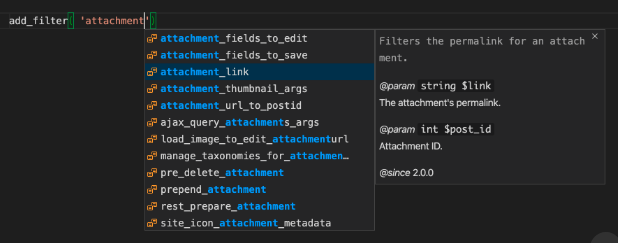
- Autocomplete Feature: It autocompletes Action and Filter hook names.
- WordPress Version Support: It supports all actions and filters up to WordPress 6.9.
- Additional Support: Supports callbacks for the following
- Functions
- Class methods
- Closures
- Arrow functions
- In addition to the above, it includes the parameter types, return types, and docblocks for improving code readability
- Extension Settings: Provides options to configure directly within the VS Code settings panel.
- Hover Tooltip: Provides information inside a tooltip about an action or a filter name when hovering over it.
How to use Hooks IntelliSense for WordPress
As soon as you start typing the name of a WordPress action or filter within add_action() or add_filter(), the magic starts. Not only the autocomplete list appears with all matching actions or filters, but the information about the selected item also appears side by side. The list continues to refine itself as you type more characters.
According to the Visual Studio Marketplace statistics, as of January 24, 2026, Hooks IntelliSense for WordPress has recorded an impressive 605,492 downloads with a 4.6 rating out of 21 review.

Search WordPress Docs
WordPress has one of the largest and well-written community-driven documentation resources in the world of content management systems. However, finding the correct document every time can become challenging, especially when you are under a tight schedule. The Search WordPress Docs VS Code extension solves this problem by providing access to the exact document directly from the editor.
How to use Search WordPress Docs:
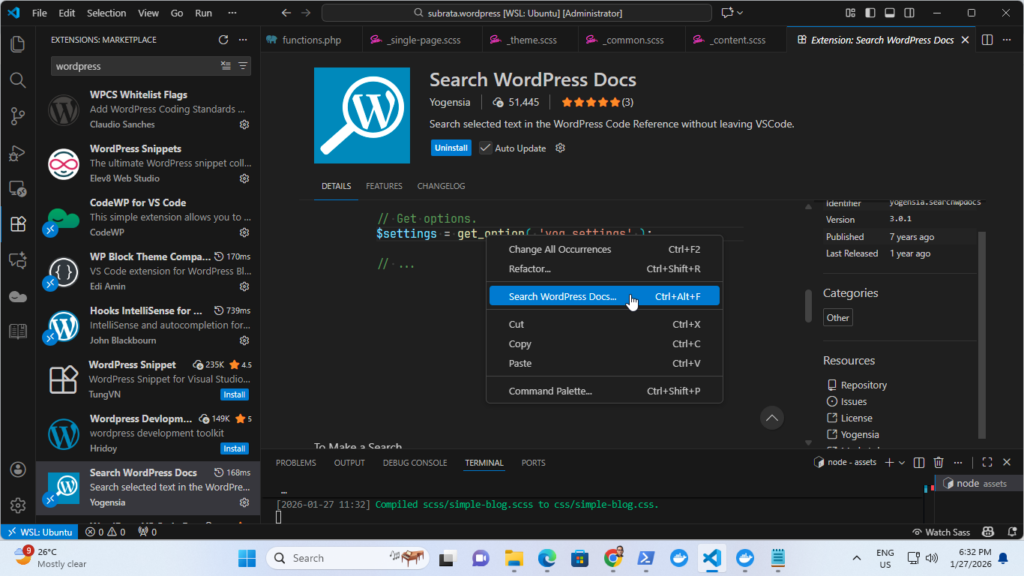
The usage is pretty straightforward. You can reach the exact document in four simple steps:
- Step 1: Open any PHP file.
- Step 2: Choose any function, put the mouse cursor on it, and right-click.
- Step 3: Click on Search WordPress Docs link in the context menu.
- Step 4: The respective documentation opens instantly in a separate panel within Visual Studio Code.
According to the Visual Studio Marketplace statistics, as of January 27, 2026, Search WordPress Docs has recorded an impressive 51,445 downloads with a 5.0 rating out of 3 reviews.
